

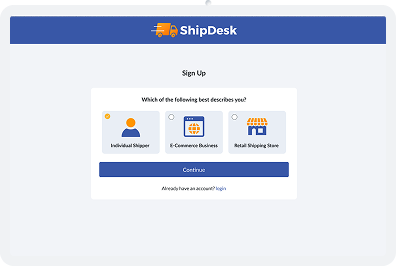
Create a Free ShipDesk Account
Sign up for a free ShipDesk account to get started.
- Create shipping labels
- Save addresses and recipients
- View shipment history and billing
- Use participating ShipDesk locations for drop-off
Enter Shipment Details
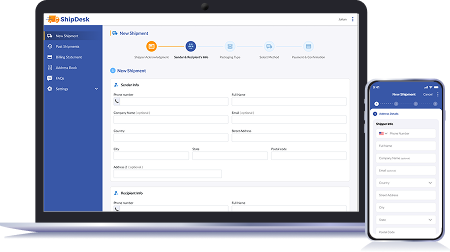
Start a new shipment by entering your shipper and recipient information.
- Validate addresses automatically
- Save recipients to your address book
- Reuse addresses for faster future shipments

Select Packaging
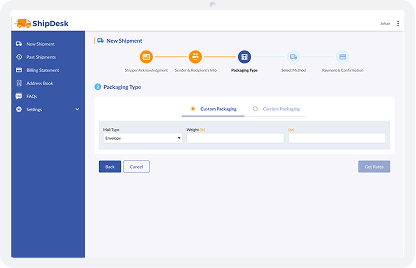
Choose how your shipment will be packaged.
Custom Packaging
Use your own envelope or box and enter the weight manually.
Carrier Packaging
Select official packaging from USPS, UPS, FedEx, or DHL. Carrier size and weight rules are applied automatically.
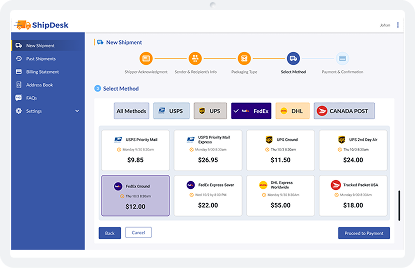
Choose a Shipping Method
ShipDesk shows available shipping options across supported carriers.
- Compare delivery times and prices
- Filter by carrier or view all methods
- Choose the option that fits your timeline and budget

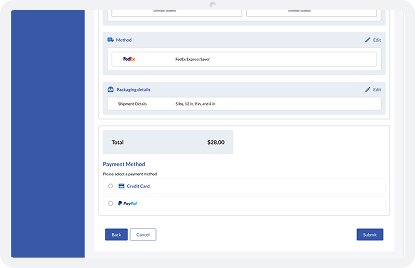
Review & Pay
Before submitting your shipment, review all details in one place.
- Shipper and recipient information
- Selected carrier and service
- Packaging and weight details
- Total cost

Drop Off at a ShipDesk Location
Once your label is created, bring your package to a participating ShipDesk location.
- Drop off your labeled package
- Some locations offer staff-assisted shipping
- Carrier availability may vary by location

Track and Manage Shipments
After shipping, ShipDesk keeps everything organized in your dashboard.
- View shipment history
- Track delivery status
- Access tracking numbers
- Review billing statements
Designed for Businesses and Individuals
Whether you ship occasionally or regularly, ShipDesk is designed to fit your workflow.

Small and medium businesses

Service providers and offices

Individuals without daily carrier pickups

Organizations that want centralized shipping records
Whether you ship occasionally or regularly, ShipDesk is designed to fit your workflow.